Use case
Answering a salary question with the range from the vacancy
The candidate wants to know what the role pays. LetterForge takes the salary range from the vacancy, reads their email and your note on what they expect, and writes the reply. You check the figures and send it.
How it works
-
Step 1
The question comes in
The candidate's email lands in your inbox as usual. LetterForge matches it to the candidate and shows it under Today as a new reply.
-
Step 2
LetterForge writes the draft
Smart Reply reads the thread, spots the salary question and writes a reply with the range from the vacancy. On Solo and Team, Smart Reply starts by itself when you open the candidate.
-
Step 3
You check it and send it
You check the figures, change what you like and open the reply in your mail app. It only goes out when you press Send.
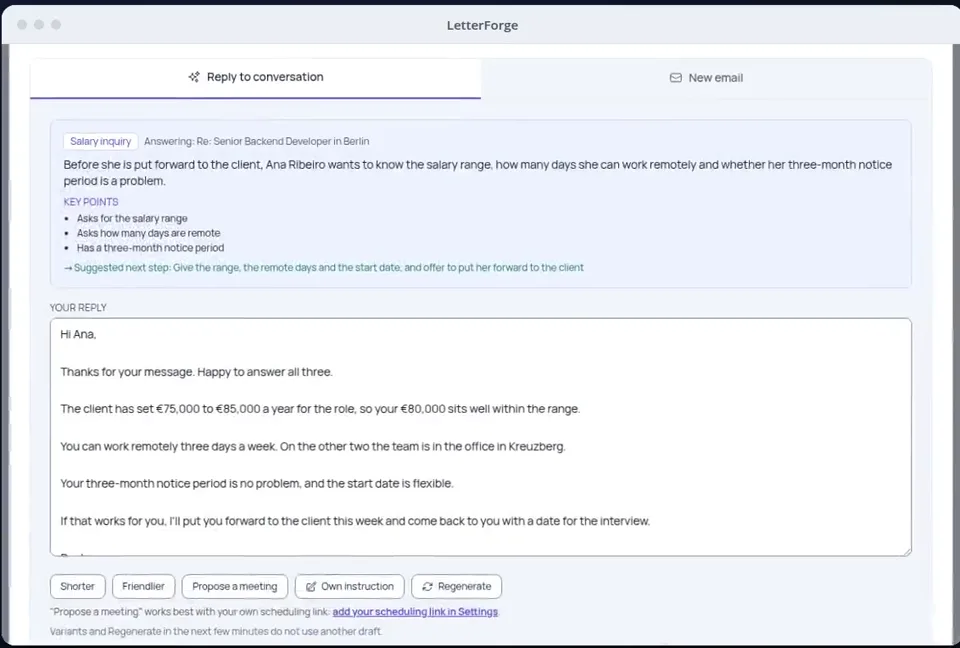
What LetterForge uses for it
- Salary, currency and period from the vacancy
- The candidate's email and the thread before it, up to seven messages
- Your call note with their salary expectation, as long as CVs and message contents may go to the AI provider (the default)
- The greeting, language and tone you have set
How to word it
Wording, rules and examples for this situation, with or without LetterForge.
FAQ
- Where does LetterForge get the salary range from?
- From the vacancy you set up once: salary, currency and period. If there is no range there, the language model is told not to make up a figure and to offer to come back to the candidate. Check the figures before you send all the same.
- Do I have to give the range?
- No. Whether and how precisely you name the range is up to you. Edit the draft before sending, or have it rewritten with "Own instruction", for example without a figure.
- Does a shorter version count as another reply?
- No. Variants such as "Shorter" or "Friendlier" and "Regenerate" in the minutes after the draft do not count as a new reply.
- What goes to the AI service for this?
- The thread with this one candidate, without signatures, phone numbers and addresses, plus the details of the vacancy. It goes through our server in the EU to OpenAI (USA), and our server does not store it. Your mailbox and every other candidate stay on your computer.
Try it yourself
Try it on your own emails, with 20 free replies a month.