Use case
Answering questions about remote work and the notice period
How many days from home? Does my notice period work for them? LetterForge answers questions like these from the vacancy and your note from the call, all of them in one email.
How it works
-
Step 1
Write it down once
The vacancy holds the location, the work mode and the description, such as three days remote. What the candidate told you on the phone, for example their notice period, goes into the call note.
-
Step 2
Smart Reply finds every question
If the candidate asks several things in one email, Smart Reply lists them as key points and answers them in the draft one by one. It also suggests the next step.
-
Step 3
You decide and send
If something differs from the vacancy, such as a later start date, change that sentence in the draft. Then open the email in your mail app and send it.
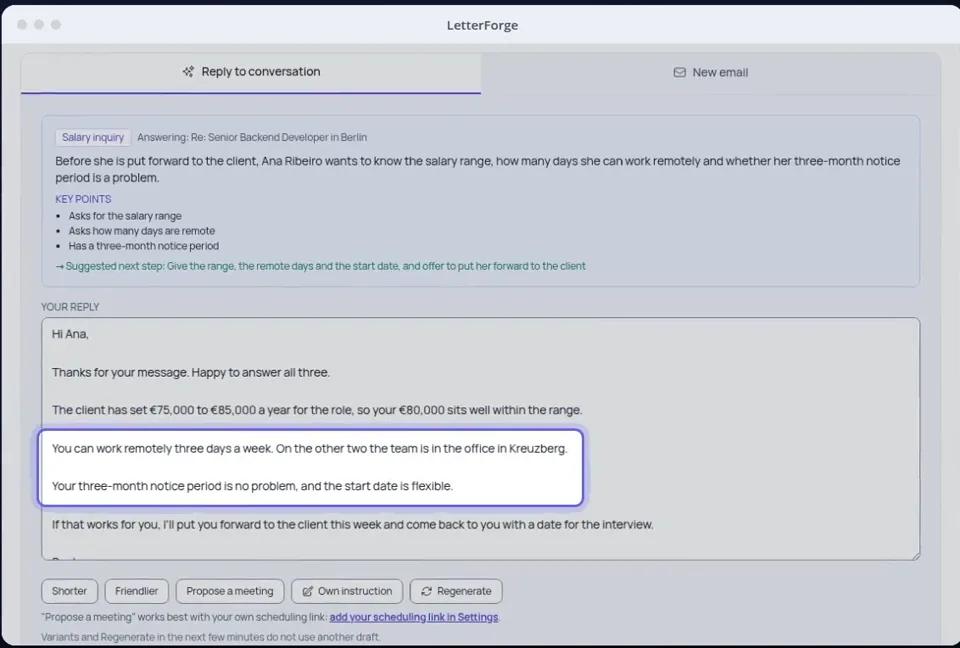
What LetterForge uses for it
- Location, work mode (on site, hybrid, remote) and description of the vacancy
- Availability and notes from your call notes, as long as CVs and message contents may go to the AI provider (the default)
- The questions from the candidate's latest email, summed up as key points
- A suggestion for the next step, for example putting them forward to the client
How to word it
Wording, rules and examples for this situation, with or without LetterForge.
FAQ
- What if the vacancy says nothing about remote work?
- Then the draft has nothing to promise. The language model is told to address the question openly and offer to come back to the candidate rather than make something up. Add the rule to the vacancy, and it applies to every candidate for that role.
- Does LetterForge remember the candidate's notice period?
- Yes, if you write it down: as the candidate's availability or in the call note. Later drafts for that candidate use it, for example when you put them forward to the client.
- Can I reply in German?
- Yes. You set the language, the form of address and the tone in the draft. LetterForge writes in English or German, or in the language the candidate writes in.
- What if only the client knows the answer?
- Then the draft is meant to say that you will check with the client rather than make up an answer. Read it before you send, especially with questions like these.
Try it yourself
Try it on your own emails, with 20 free replies a month.