Use case
Following up when a candidate goes quiet
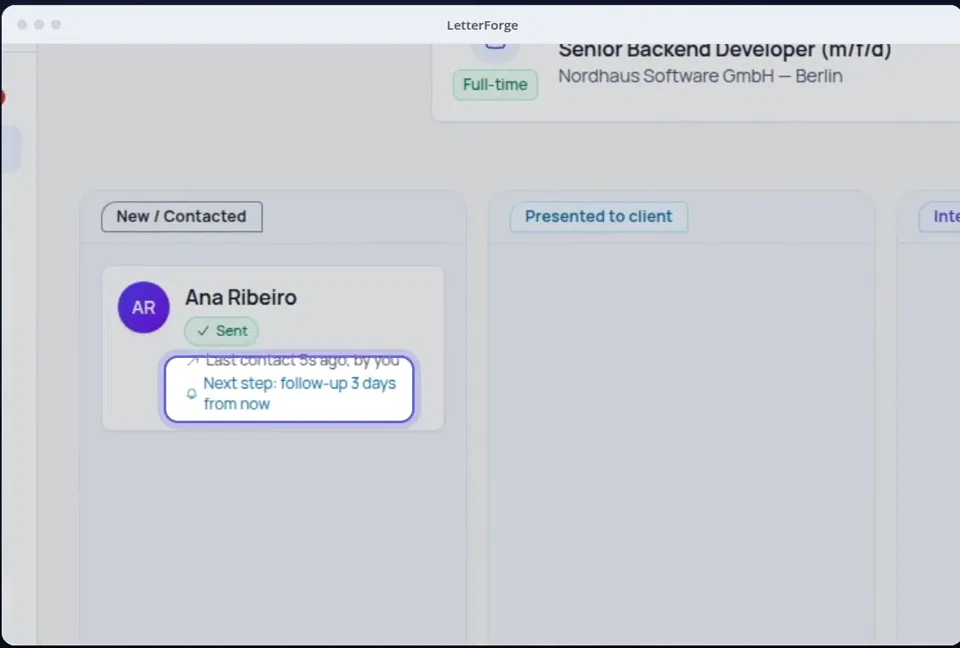
After every email that is waiting for an answer, LetterForge sets a date to follow up. If the candidate stays silent, they show up under Today, and the draft for the follow-up is one click away.
How it works
-
Step 1
Send the email, the reminder follows
When LetterForge finds your email in the Sent folder, it sets a reminder, two to five days later depending on the kind of email. If that falls on a weekend, it moves to the Monday.
-
Step 2
Follow-ups due under Today
Under Today you see who has not replied yet. With "Prepare draft", LetterForge writes the follow-up from the thread so far. If you like, it prepares the drafts for the day in the morning.
-
Step 3
When the candidate replies, the reminder ends
When a reply comes in, by email or as a pasted LinkedIn message, the follow-up is dropped and the reply shows under Today.
What LetterForge uses for it
- The date and kind of your last email to the candidate
- The thread so far, so the follow-up picks up where you left off
- Your setting for preparing drafts in the morning (off by default)
- No more prepared drafts than you have left this month
How to word it
Wording, rules and examples for this situation, with or without LetterForge.
FAQ
- How many days does LetterForge wait?
- That depends on the email: two days after a reminder, three after an offer, four after a reply and five after a first approach or a follow-up. You can move the date on the candidate.
- Does LetterForge send the follow-up itself?
- No. LetterForge prepares the draft. Emails only go out from your mail app, and only when you click.
- Does a prepared draft use up a reply?
- Yes, each prepared draft counts as one reply. That is why preparing them in the morning is off at first, and it never uses more drafts than you have left for the month.
- When should I stop following up?
- That is your call. The guide on following up suggests intervals for each stage of the process and says when a friendly closing email works better than the next nudge.
Try it yourself
Try it on your own emails, with 20 free replies a month.